Archive for the ‘Node.js’ Category

A callback is a function which is passed as an argument to another function and invoked with the results generated after that function execution is completed. The result is propagated to the callback function instead of directly returning it.

A very simple example of a function directly returning results and the same with callback is shown in the snippet below.
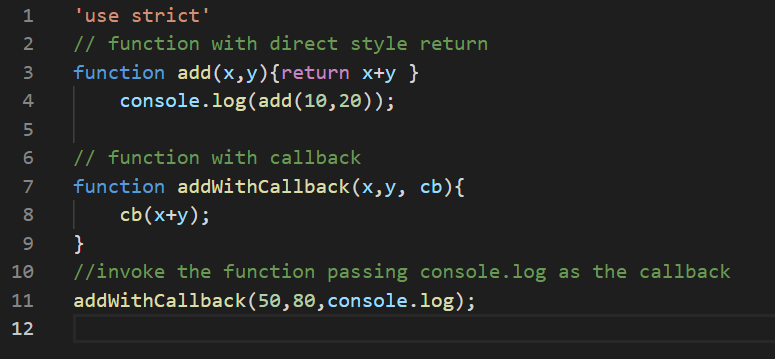
image

Node.js makes use of callbacks as a way to notify about completion of asynchronous operations.Once an asynchronous operation is completed the callbacks are invoked with the results of the asynchronous operation.

The code snippet given below performs the following tasks:

  • Download contents from a specified URL
    • This is done using the Needle http client
  • Make a directory if it does not exists
    • This is done using mkdirp, the Node.js version of mkdir – p. Note, I have used the deprecated version 0.5.0 to use the callback for demonstration purposes, the latest versions use promises.
  • Save the contents from the specified URL with a given file name

image

In the above code you can see that nesting of the if-else blocks and in-place callback definitions are making the code hard to read and maintain. This problem will increase further with complexity of the tasks and deeper the levels of nesting. This problem is referred to as the “Callback Hell” or “Pyramid of Doom” in JavaScript ( as the code takes the form of a pyramid due to deep levels of nesting).

This problem can be avoided by:

  • Following the early return principle i.e. returning from the control flow as early as possible.
  • Using named function definitions instead of in-place closures
  • Making the code more modular by extracting re-usable code into separate functions.

The above code is refactored using the above guidelines. The tasks of directory checking / creation and writing to file is splitted into two named function as shown below:

image

image

The function downloadFile is now the entry point. All the functions returns in case of any error avoiding the if-else nesting which was used earlier.

image

    In this post we will examine how the module initialization in Node.js is affected by the circular dependencies ( we will restrict this discussion to the CommonJS specification based module system)

    I have created this simple system with three files, the main file app.js and other two modules modulea.js and moduleb.js

    image

    The two modules modulea and moduleb cross reference each other leading to a circular dependency.

    image

    I have put together few lines of code to check how the loading works as shown below.

    image

    image

    image

    The program produces the following output:

    image

    Let’s note the discrepancy, a.b.counter is 2 while b.a.counter is 1. This is due to the circular dependency and loading sequence of the modules as shown in the flow chart below.

    Untitled

    b.a.counter value is 1 as the moduleb is loaded from the cache into app.js ( moduleb is already loaded while loading modulea and cached).

    If we switch the sequence of initialization value will get altered as shown below:

    image

    image

    module.exports vs exports in Node.js

    Posted: August 14, 2021 in Node.js
    Tags: ,

    Let’s start by developing a simple ( or sample) Node module as shown below.

    image

    The file mymodule.js contain the following lines of code to expose two functions with the properties a and b using the exports variable.

    image

    This module is loaded using the require function as shown below.

    image

    A very simple code with Node.js module and produces the following output.

    image

    Now, I will change the code in mymodule.js and app.js as follows:

    image

    image

    The program output now changes and properties a and b are no longer available publicly from app.js.

    image

    So what’s going on in here ? What’s the difference between module.exports and exports ?

    module.exports is the variable used by the require function to expose a public property or an API. This variable is actually returned to the calling scope.

    The exports variable is just holds a reference to module.exports.

    image

    So initially they refer to the same object. But if module.exports is directly assigned a value then that value gets returned to the caller’s scope only.

    image

    The following code will also not work.

    image

    This will lead to the following error.

    image

    This is because re-assigning the exports variable to a different object will not have any impact on the contents of the module.exports variable and none of the properties will be publicly exposed to be used by the caller.

    This might look a bit confusing. The exports variable is just an alias to expose the public APIs conveniently. If it becomes too much confusing its better to use module.exports.

    image